Markdown for AI
Markdown for AI serves your post content as Markdown when an AI agent asks for it. Browsers still get the normal HTML page, while AI tools get a clean Markdown copy of the same URL.
The feature uses HTTP content negotiation: the agent sends an Accept: text/markdown header, and Slim SEO Pro returns Markdown instead of HTML. The canonical URL does not change, so you do not need a separate .md URL.
Why Markdown for AI matters
AI agents fetch your pages to answer questions and cite sources. A normal HTML response includes navigation, scripts, ads, and layout wrappers, so the agent must dig through that noise to reach your content.
Markdown drops the chrome and keeps the article structure (headings, links, lists, tables, and code). That cuts tokens, improves retrieval quality, and speeds up agent responses, while humans still get the normal HTML page.
How it works
The feature runs only on singular posts (and other singular content of the post types you select). It does not run on archives, the home page, search results, feeds, previews, or password-protected posts.
When a client requests a singular post URL with Accept: text/markdown in the request header, Slim SEO Pro returns the post as Markdown. If that header is missing or prefers HTML, the normal theme page loads.
HTML and Markdown share the same post URL. AI agents such as Claude Code or Cursor only need to send the Accept: text/markdown header. They do not need a second URL that ends with .md.
The plugin also sends Vary: Accept, so caches and CDNs can store HTML and Markdown as separate variants of the same URL.
Markdown responses skip the page cache (DONOTCACHEPAGE). The URL alone cannot tell Markdown from HTML, so this avoids a shared cache entry that serves the wrong format.
Enable Markdown for AI
- Go to Settings → Slim SEO → Features.
- Turn on Markdown for AI (Pro).
- Open Select post types under that feature.
- Select the post types that must serve Markdown (for example, Posts or Pages).
- Click Save Changes.
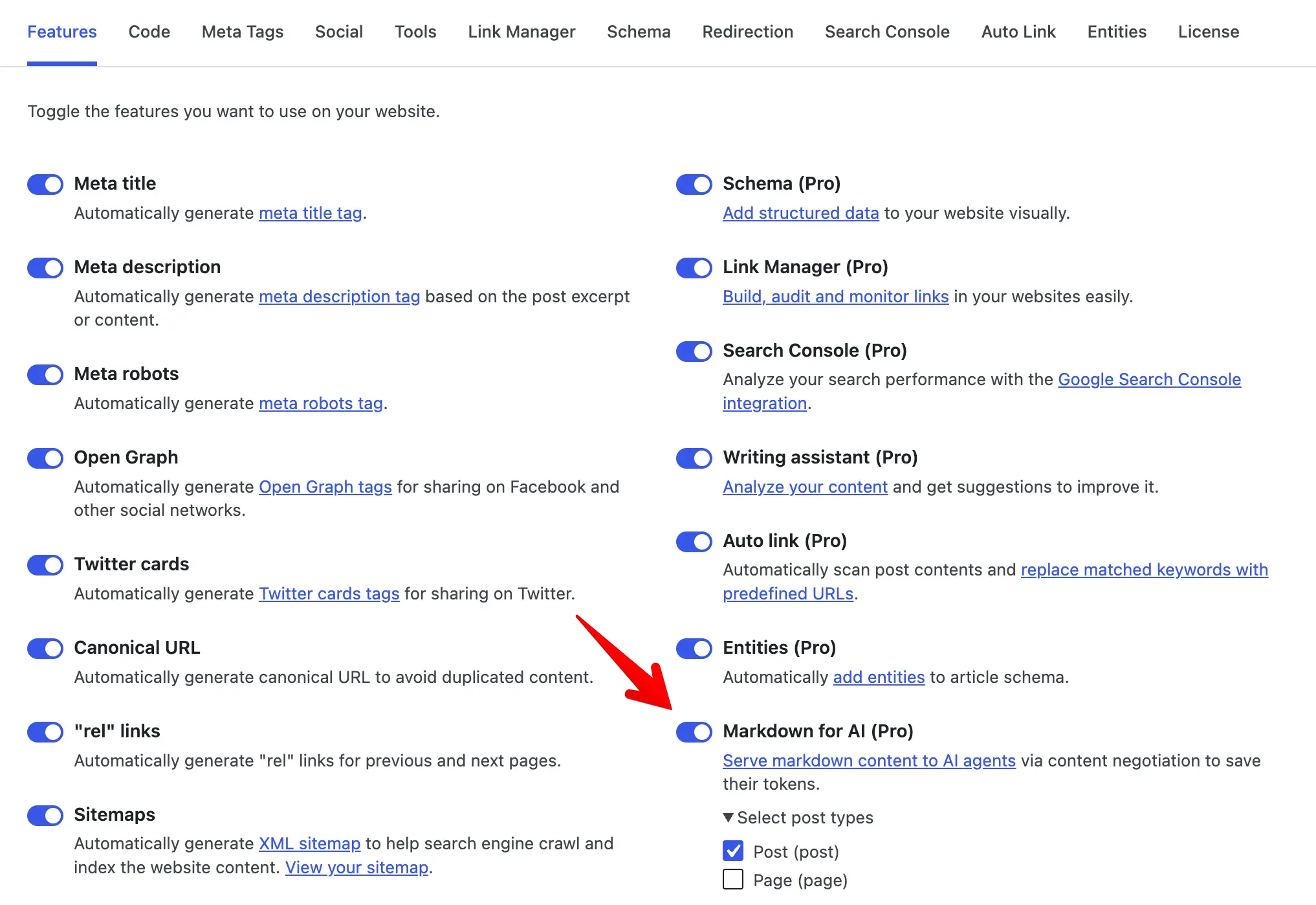
By default, the feature is on for the post post type.
What the Markdown contains
Each Markdown response has two parts:
- YAML front matter with post metadata
- Body converted from the post content
Front matter fields:
| Field | Meaning |
|---|---|
title | Post title |
url | Permalink |
date | Publish date (ISO 8601) |
modified | Last modified date (ISO 8601) |
Example:
---
title: "How to install Slim SEO Pro"
url: "https://example.com/install-slim-seo-pro/"
date: "2026-08-01T10:00:00+00:00"
modified: "2026-08-07T08:30:00+00:00"
---

## Installation

1. Download the plugin zip file.
2. Upload and activate it in WordPress.
The body comes from the post content after blocks and shortcodes render. The plugin converts HTML to Markdown, strips script and style tags, and cleans code blocks so fenced code stays readable. Tables convert to Markdown tables when possible.
Test the response
Run this command against a published post URL:
curl -sI -H "Accept: text/markdown" https://example.com/your-post/
Make sure that the response includes:
Content-Type: text/markdownVary: Accept
Then fetch the body:
curl -s -H "Accept: text/markdown" https://example.com/your-post/
You must see YAML front matter and Markdown content. If you send Accept: text/html, or omit Markdown from Accept, you get the normal HTML page.
You can also use acceptmarkdown.com to score a URL for Markdown content negotiation.
FAQ
Do browsers see Markdown?
No. Browsers send Accept headers that prefer HTML, so they keep getting the normal page. Only clients that prefer text/markdown get Markdown.
Do I need a .md URL?
No. Slim SEO Pro serves Markdown on the canonical post URL when the Accept header asks for it.
Does this change SEO for Google?
Search crawlers that request HTML still get HTML. The feature targets AI agents that ask for Markdown, and your public HTML page and canonical URL stay the same.
What if my cache or CDN ignores Vary: Accept?
Markdown responses set DONOTCACHEPAGE so common WordPress page caches skip them. If a CDN caches HTML and Markdown under one key and ignores Vary, configure the CDN to respect Vary: Accept. You can also exclude those URLs from the edge cache for agent traffic.
Can I enable Markdown for custom post types?
Yes. Select them under Select post types on the Features tab.